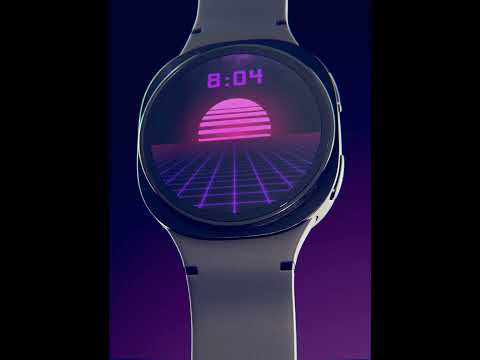

Vaporwave Watch Face

star
54 reviews

Everyone
info
1K+
Downloads

Everyone
Learn more


About this app
An animated retrowave watch face, featuring an impressive number of customization options, an endless animation and the day / night cycle! Amoled friendly and compatible with square watches!
This is a native, standalone Wear OS watch face. This means that it can be installed on many smartwatches running this OS (like Samsung, Mobvoi Ticwatch, Fossil, Oppo, the latest Xiaomi and more).
It is completely handcrafted, to be unique.
The watch face includes:
◉ 30 color schemes
◉ Animated glowing grid
◉ Weather and temperature
◉ A massive number of different customization options (420 MILLIONS of combinations)
◉ Amoled friendly, custom and optimized AOD
◉ Real day night cycle, the moon reflect the actual moon phase!
◉ Reacts to low battery and other events
◉ 7 customizable complications, many touch actions
◉ Round and square watches supported!
◉ 12/24h format, automatic date format
◉ Easy to use (and uninstallable) companion app
The installation is straightforward, don't worry!
Here's the procedure and a quick Q&A:
◉ Install this app in your smartphone
◉ Open it, and connect your Wear OS smartwatch to your device
◉ If the watch is connected, you will be able to tap the "view and install on smartwatch" button. (if not, refer to the Q&A below)
◉ Check your watch, you should see my watch face and the install button (if you see the price instead, refer to the Q&A below)
◉ Install it in your smartwatch
◉ Long press on your current watch face
◉ Swipe left until you see a "+" button, tap on it
◉ Look for the new watch face, tap on it
◉ Done. If you want, you can uninstall the companion app now!
Q&A
Q - I'm being charged twice! / The watch is asking me to pay again / you're a [derogatory adjective]
A - Keep calm. This happens when the account you’re using on the smartphone is different from the account used on the smartwatch. You have to use the same account (else, Google has no way to know that you already bought the watch face).
Q - I can't press the button in the companion app but my smartwatch is connected, why?
A - Most probably, you're using an incompatible device, like an old Samsung smartwatch or any other non-Wear OS smartwatch/smartband. You can easily check on Google if your device runs Wear OS before installling any watch face. If you're sure you have a Wear OS device and still you can't press the button, open the Play Store on your watch and search for my watch face manually!
Q - I have a Wear OS device, but it's not working! I'm gonna leave a one star review 😏
A - Stop right there! Most definitely there's an issue on your side while following the procedure, so please just send me an email (i usually reply during the weekends) and don't damage me with a bad and misleading review!
Q - The [name of a feature] is not working!
A - Try setting another watch face and then set mine again, or try allowing the permissions manually (on the watch obviously). If it still doesn't work, there's an handy "email button" in the companion app!
If you need help or you have a suggestion, feel free to send me an email, I'll do my best to help.
I usually reply during the weekend because I'm just one person (not a company) and I have a job, so be patient!
This app is supported and updated to fix bugs and add new features. The overall design won't change, but it will surely be improved over time!
I know that the price isn't the lowest, but I worked a lot of hours on each watch face and the price also includes the support and the updates, if you think about it. And i assure you, I'll invest any earning on useful things and to help my family. Oh, and thanks for reading the full description! Nobody does it!
Introduction
This is a native, standalone Wear OS watch face. This means that it can be installed on many smartwatches running this OS (like Samsung, Mobvoi Ticwatch, Fossil, Oppo, the latest Xiaomi and more).
It is completely handcrafted, to be unique.
Features
The watch face includes:
◉ 30 color schemes
◉ Animated glowing grid
◉ Weather and temperature
◉ A massive number of different customization options (420 MILLIONS of combinations)
◉ Amoled friendly, custom and optimized AOD
◉ Real day night cycle, the moon reflect the actual moon phase!
◉ Reacts to low battery and other events
◉ 7 customizable complications, many touch actions
◉ Round and square watches supported!
◉ 12/24h format, automatic date format
◉ Easy to use (and uninstallable) companion app
Installation
The installation is straightforward, don't worry!
Here's the procedure and a quick Q&A:
◉ Install this app in your smartphone
◉ Open it, and connect your Wear OS smartwatch to your device
◉ If the watch is connected, you will be able to tap the "view and install on smartwatch" button. (if not, refer to the Q&A below)
◉ Check your watch, you should see my watch face and the install button (if you see the price instead, refer to the Q&A below)
◉ Install it in your smartwatch
◉ Long press on your current watch face
◉ Swipe left until you see a "+" button, tap on it
◉ Look for the new watch face, tap on it
◉ Done. If you want, you can uninstall the companion app now!
Q&A
Q - I'm being charged twice! / The watch is asking me to pay again / you're a [derogatory adjective]
A - Keep calm. This happens when the account you’re using on the smartphone is different from the account used on the smartwatch. You have to use the same account (else, Google has no way to know that you already bought the watch face).
Q - I can't press the button in the companion app but my smartwatch is connected, why?
A - Most probably, you're using an incompatible device, like an old Samsung smartwatch or any other non-Wear OS smartwatch/smartband. You can easily check on Google if your device runs Wear OS before installling any watch face. If you're sure you have a Wear OS device and still you can't press the button, open the Play Store on your watch and search for my watch face manually!
Q - I have a Wear OS device, but it's not working! I'm gonna leave a one star review 😏
A - Stop right there! Most definitely there's an issue on your side while following the procedure, so please just send me an email (i usually reply during the weekends) and don't damage me with a bad and misleading review!
Q - The [name of a feature] is not working!
A - Try setting another watch face and then set mine again, or try allowing the permissions manually (on the watch obviously). If it still doesn't work, there's an handy "email button" in the companion app!
Support
If you need help or you have a suggestion, feel free to send me an email, I'll do my best to help.
I usually reply during the weekend because I'm just one person (not a company) and I have a job, so be patient!
This app is supported and updated to fix bugs and add new features. The overall design won't change, but it will surely be improved over time!
I know that the price isn't the lowest, but I worked a lot of hours on each watch face and the price also includes the support and the updates, if you think about it. And i assure you, I'll invest any earning on useful things and to help my family. Oh, and thanks for reading the full description! Nobody does it!
An everchanging digital watch face, featuring a unique retrowave animated style!
Updated on
Safety starts with understanding how developers collect and share your data. Data privacy and security practices may vary based on your use, region, and age. The developer provided this information and may update it over time.
- No data shared with third partiesLearn more about how developers declare sharing
- No data collectedLearn more about how developers declare collection
- Committed to follow the Play Families Policy


Ratings and reviews
29 reviews

Howard Costner
- Flag inappropriate
May 14, 2025
I really like this watch face, but I don't think it works well with the Galaxy Watch FE. The animation freezes often, and it doesn't let you customize it from the app, and trying to customize from the FE watch is really difficult to navigate. If you have a higher end Galaxy Watch, this watch face works great. I really wish that this Watch Face would work with my watch, but this is my second time trying to get it to work on the Galaxy Watch FE. This is the best WatchFace if you like Synth wave.
RazorSharp Design Studio
May 14, 2025
Well there's a fix for the customization problem and a couple things you can do to optimize it! Send me an email if you want :)

Stefan
- Flag inappropriate
January 24, 2025
I want to review more of the free watch faces but I'll just rate all of them in this review. for the people that don't want to waste money on expensive but ugly watch faces, I recommend you look on here for watch faces, they're very cheap and easy to setup. 5 stars to all the watch faces
RazorSharp Design Studio
January 24, 2025
Well, if you have a minute, feel free to review the others! It helps me a lot :)
Thanks a lot for the review!

Ryan Schneider
- Flag inappropriate
November 30, 2025
The little things really make this the best watch face I've ever seen. The core of this app is exactly what I wanted, but the little things make it a watch face that makes me informed on the things I never really cared about in a watch face but in a clever way. Usually watch faces show you the phase of the moon in its own customization you can't remove. This sneaks it in showing the phase on the background of the wallpaper, saving a customization. One suggestion is to add haptic or audible tick.
Everyone
Learn moreApp support
About the developer
Gianluca Conti
rzrshrpstudio@gmail.com
Via Tommaso Albinoni, 114
00052 Valcanneto
Italy
+39 353 487 7041


