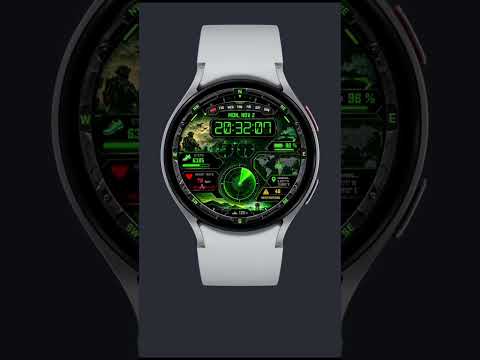

Army Military Watch face


Everyone
info
0+
Downloads

Everyone
Learn more


About this app
Army Military Watch Face – Tactical HUD Watch Face for Wear OS
Give your smartwatch a rugged, mission-ready look. Army Military Watch Face combines a tactical HUD, a radar scope, a world map and a compass bezel with large digital time and your key daily stats.
Animated tactical display
The HUD comes alive when your watch wakes up, with animated scanning and glowing elements across the face.
Mission data at a glance
• Large digital time in 12h or 24h format
• Date with a weekday indicator bar
• Battery percentage with a level bar
• Step count with a progress bar
• Heart rate (bpm)
• Unread notification count
Features
• Digital time, 12h and 24h
• Date and day indicator
• Battery percentage and level
• Steps count and progress
• Heart rate
• Unread notifications
• Photo slot for your own background
• Animation
• Always-On Display (AOD) mode
Photo slot
Set your own image from your phone as the background, such as a unit photo, a camouflage pattern or a favourite place.
Always-On Display (AOD)
AOD mode switches to a clean black screen with large digital time, the date and battery level inside the compass bezel, using very little power.
How to apply
1. Install the watch face on your Wear OS watch.
2. Long-press the current watch face.
3. Find Army Military Watch Face and tap to apply.
4. Tap Customize to set your own photo.
Compatibility
Works with Wear OS watches with round displays, including Samsung Galaxy Watch (Wear OS models) and Google Pixel Watch.
Privacy
This watch face does not collect, store or share any personal data. Health data and notifications are shown only on your watch, and any photo you choose stays on your devices.
Army tactical watch face with animation, 12h/24h time, health stats and AOD
Updated on
Safety starts with understanding how developers collect and share your data. Data privacy and security practices may vary based on your use, region, and age. The developer provided this information and may update it over time.
- No data shared with third partiesLearn more about how developers declare sharing
- No data collectedLearn more about how developers declare collection


Everyone
Learn moreApp support
About the developer
Rajaperumal Hettige Malith Prasanna Wimalarathna
malithmpw@gmail.com
Gurugala
Imbulana
Ruwanwella 71313
Sri Lanka
+94 71 485 9905


