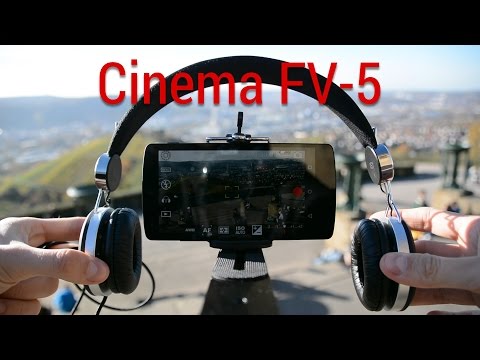

Cinema FV-5

star
6.73K reviews

Everyone
info
100K+
Downloads

Everyone
Learn more


About this app
Cinema FV-5 is a professional video camera application for mobile devices, that puts professional manual controls in your fingertips. Tailored to enthusiast and professional videographers and filmmakers, with this video camera application you can capture the best footage with top-of-the-line controls for perfect postproduction purposes. The only limit is your imagination and creativity!
Major features:
● Adjust all the image sensor parameters that you only thought pro-videocameras had: exposure compensation, ISO, light metering mode (matrix/center/spot), focus mode and white balance.
● Change sensor parameters (like ISO, exposure compensation or white balance) also during recording.
● Focus adjustments during recording: lock focus on your subject before recording and change focus planes while recording.
● Professional viewfinder: 10+ compositing grids, 10+ crop guides available, safe areas display and much more.
● The most advanced electronic viewfinder on a video camera: live RGB and luminance histogram are available also during recording.
● Professional sound metering options: display audio peaks and sound clipping warnings during recording.
● Use any audio input source for your video: built-in microphone, external (wired) microphone or wireless (Bluetooth) headset.
● Choose video and audio codec, adjust the bitrates, audio sampling rates and number of channels.
● Record in 4K UHD (Ultra High Definition) video on supported devices.
● All camera functions assignable to volume keys. You can adjust EV, ISO, color temperature, zoom and more using volume keys (including those in cable-headsets) as well as focusing and recording. Devices with hardware camera shutter keys are also supported.
● Video geotagging support.
● Autofocus, macro, touch focus and infinity focus modes, plus a focus lock switch (AF-L).
● Autoexposure (AE-L) and auto white balance (AWB-L) locks in Android 4.0+. You can also lock exposure and white balance during clip recording automatically.
● Zoom after and while recording. Set specific focal lengths thanks to the 35mm equivalent-based focal length display.
● Powerful video clips organization options: different storage locations and fully customizable file names (even with variables).
Cinema FV-5 is the perfect app for producing the best footage for any short- to medium-sized production. With it you can record the best material possible with any medium- to high-end device. Cinema FV-5 specially supports Android-based compact cameras, so you can even leverage a high-quality, optically stabilized zoom. The footage captured with Cinema FV-5 can be easily edited on any NLE application.
For more information, visit the official website http://www.cinemafv5.com or download the official Cinema FV-5 User Guide at http://www.cinemafv5.com/tutorials/user_manual.php. For technical support, please read the FAQ (http://www.cinemafv5.com/faq.php) or write to support@cinemafv5.com.
Permissions explained:
- Approximate location and precise location: only used for geotagging functionality (disabled by default, and requires manual GPS activation).
- Modify or delete the contents of your USB storage and take pictures and videos: required for the usual camera operation.
Professional video recording application with manual controls for filmmakers!
Updated on
Safety starts with understanding how developers collect and share your data. Data privacy and security practices may vary based on your use, region, and age. The developer provided this information and may update it over time.
- No data shared with third partiesLearn more about how developers declare sharing
- This app may collect these data typesApp info and performance
- Data is encrypted in transit
- You can request that data be deleted


Ratings and reviews
6.56K reviews

FORT NEWS
- Flag inappropriate
- Show review history
November 5, 2026
Most smartphones these days come equipped with either Optical Image Stabilisation (OIS) or Electronic Image Stabilisation (EIS) to minimise camera shake and deliver smoother, more stable video recordings. I would gladly give this app a 5-star rating if you could introduce an image stabilisation feature. This would significantly improve the video recording experience, especially for users who rely on their smartphones for professional video production and livestreaming.

A Google user
- Flag inappropriate
- Show review history
December 21, 2020
Paid for it and I can't even use it. Won't record on 4K it glitches out every single time I try to record something. If I'm able to record something is only on 1:1 ratio when crashes after I try to review what I just recorded it. Unusable at this moment. Too bad the company it can't keep up with its internet glory of this app. Lots of Bugs! Not worth it unless they get it fixed. Galaxy Note8
8 people found this review helpful

Amir Riaz
- Flag inappropriate
- Show review history
June 25, 2026
I really like this camera app. But don't have two features in this app. One is to manually adjust the shutter speed and 2nd record real sound from the External mic. Please add both of these features. Thank you.
5 people found this review helpful
What’s new
- Specific support for Android 14 and 15.
- Now the app does not need or request storage permissions for Android 10 onwards.
Everyone
Learn moreApp support
About the developer
Flavio González Vázquez
contact@fgae.de
Bahnhofstr. 43
71409 Schwaikheim
Germany
+49 7195 9299768


