
Infinite Painter
In-app purchases

star
249K reviews

Everyone
info
10M+
Downloads
Enjoy this app for free, plus many more free of ads and in-app purchases, with a Google Play Pass subscription. Learn more


About this app
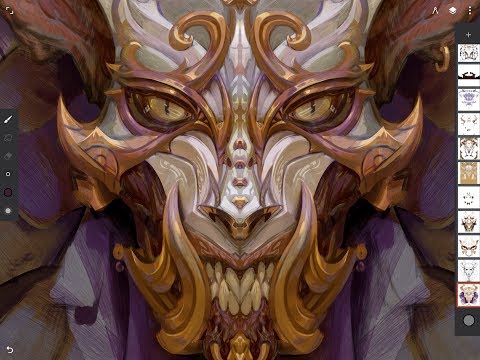
Experience one of the best-designed painting, sketching, and drawing apps for tablets, phones, and Chromebooks. Used by millions, this award-winning app brings rich, powerful features to all artists, whether art is your hobby, passion or career.
HIGHLIGHTS
- Best-in-class pencils
- Minimal and intuitive interface
- Robust, powerful tool set
- Share Timelapse recordings with your friends
- Convert brush strokes into editable shapes
REIMAGINING BRUSHES
- Hundreds of built-in brushes
- Realistic brush to canvas interaction
- Over 100 customizable brush settings
- Organize and share your favorite brushes and brush sets
- Designed for stylus devices with full pressure and tilt support
- Apply realtime color adjustments and live effects to any brush
- Sample lower layers when blending
- Import and export custom brushes and brush sets
GETTING THE MOST OUT OF YOUR SPACE
- More canvas, less clutter with a clean, customizable interface
- Assign finger functions separate from your stylus
- Expand and collapse layers with a flick
- Dock brush settings for quick, easy editing
- Quick access eyedropper
- Rotate and flip canvas with gestures
- Group layers with a pinch
MAKING ART LESS WORK
- Pin tools and actions to the main interface
- Pull the color wheel on the canvas with two fingers
- Add multiple reference images
- Lighting-fast saving and loading
- Step back in time with Project History
DIVERSIFYING TOOLS
- Simple or complex symmetry with Radial or Kaleidoscope
- Draw with precision using Guides or Shapes
- Smart shape detection by pausing when drawing
- Innovative Hatching guide
NEVER LOSING PERSPECTIVE
- Design 3D cityscapes with five different Perspective Guides
- Drag Rectangle and Circle shapes in perspective
- Create game art with Isometric perspective
PIXEL-PERFECT EDITING
- Seamless Pattern projects
- Selection & Masking tools
- Industry-leading Transformations
- Transform multiple layers at once
- Gradient and Pattern Fill tools
- Target separate layers or all layers with Fill tools
- Drag with Fill tool or Magic Wand for live tolerance adjustment
- Bring your painting to life with Timelapse
- Canvas Preview with flip and grayscale (for checking proportions and values)
- Artistic & Photo cloning
- Tools for pattern creation
EVERYTHING YOU NEED TO CREATE
- 64-bit Deep Color when painting
- Layer support with 30 blend modes
- Masks for layers, adjustments, and groups
- Clipping masks
- Gradient map, Color Curves, and Filter layers
- Industry-leading color correction
- Over 40 live Filter effects
- Focus and Tilt-shift masking
- Liquify
- Crop and Resize
- Pattern and Array tools
- Powerful selection workspace
- Photoshop®-like smart layers for multiple transformations without loss of quality
- Solo & Trace modes
- Print presets & CMYK color modes
ACCELERATE YOUR WORKFLOW
- Import from Photos, Camera, Clipboard, or Image Search
- Search over 1 million free for commercial-use images
- Export images as JPG, PNG, WEBP, ZIP, layered PSD files, or Painter projects
- Share artwork to Infinite Painter's ever-growing community and see what others are creating #InfinitePainter
WHAT’S FREE?
- 3 layers at the device resolution
- Solid Fill, Lasso selection, Basic Transform and Symmetry tools
- Seamless Pattern projects
- All the built-in brushes and brush editing
- Smart shape detection
WHAT’S PRO?
- HD canvas sizes and tons of layers*
- Adjustments and live Filter layers
- Layer groups and masks
- Over 40 powerful, professional tools
* Maximum number of layers depends on the canvas size and your device
TAKE INFINITE PAINTER WITH YOU
See what you can do.
ARTIST CREDITS
Tiffanie Mang
Yong Hong Zhong
Kamila Stankiewicz
Anthony Jones (RobotPencil)
Andrew Theophilopoulos (Theonidas)
Piotr Kann
@dwight_theartist
Constantine Rotkevich
Diane Kay
Ssecretgarden
Gadelhac
RapCore
Sunyu
Painting, drawing, & sketching
Updated on
Safety starts with understanding how developers collect and share your data. Data privacy and security practices may vary based on your use, region, and age. The developer provided this information and may update it over time.


Ratings and reviews
162K reviews

Christy Halek
- Flag inappropriate
May 10, 2022
I really do love this app, so much that I have stoped carrying my sketch book with me. It has come a long way over the years. The one thing that is missing is a Text tool. I use Painter for comic illustrations and the ability to add text would be wonderful. Also, the latest version has a bug in the color changer menu. Seems to be permanently stuck on brightness.
26 people found this review helpful

Bryan Gosselin
- Flag inappropriate
January 30, 2026
I've been using Infinite Painter for like 10 YEARS. It's had its ups and downs. I had it rated at 4 stars - almost perfect. Then they changed it, got rid of some stuff I loved, and it started crashing CONSTANTLY. So, down to 1 star. Fast forward to today. I USE INFINITE PAINTER ALMOST DAILY. It's frickin amazing. It hasn't crashed in so long, missing tools are back (and then some), there are 3rd party custom brushes and pallets all over - more than you'll ever need. Love it. Nice job devs. ❤🎨🖌
44 people found this review helpful

A Google user
- Flag inappropriate
- Show review history
January 3, 2019
I use this app to make art and edit photos. I've noticed there is no text tool (unless I'm not looking hard enough) but other than that I do like all the features the app has to offer. Overall it's a good app but the one thing that frustrates me the most is that its ALWAYS crashing on me.it takes me twice as long to complete a piece of art because I have to keep restarting the app and I also have to save Very often out of fear that I will lose all my work. I really do want to rate this app
4 people found this review helpful
What’s new
7.2.11:
- Improved PSD support
- Redesigned Classroom with short video demos
- Improved Timelapse quality for longer project sessions
7.2:
- New Text tool
Visit www.infinitestudio.art for details and feedback.
App support
About the developer
Infinite Studio LLC
support@infinitestudio.art
1001 Wilshire Blvd
Los Angeles, CA 90017
United States
+1 213-866-2595


