
Readexa: PDF & EPUB Reader
Contains adsIn-app purchases

star
343 reviews

Everyone
info
10K+
Downloads


About this app
Readexa is an ebook reader and comic reader that keeps your EPUBs, PDFs and comics in one library. Save web articles for later, follow a web novel chapter by chapter, and have your own books read aloud when you would rather not look at a screen.
• EPUB READER, PDF READER AND COMICS
Open EPUB books and PDF documents, and page through comics in the CBZ reader. It works as a MOBI reader too: MOBI, AZW3, FB2, DOCX, TXT, Markdown and HTML files are converted to EPUB as you add them. Browse public OPDS catalogues and download supported ebooks. Your reading progress is saved, so you pick up where you stopped.
• LISTEN TO YOUR OWN BOOKS
Readexa is a text to speech reader for your own EPUB books, PDFs and web articles. The voices run on your device and are downloaded when you choose one. Adjust the reading speed, keep listening with the screen off and in the background, and set a sleep timer for a number of minutes or for the end of the chapter.
• MORE VOICES WITH PRO
The free version installs up to three voices. With Pro, install as many as you like, including premium voices.
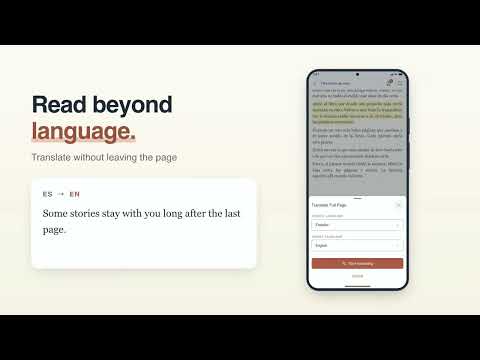
• OFFLINE TRANSLATION AS YOU READ
Select a passage to translate EPUB books, PDFs and web pages in place, one passage at a time. Translation runs on your device: the language pack downloads the first time you use a pair, then works without a connection. On comic pages, OCR text recognition reads the words drawn into the artwork and shows the translation over them.
• AI TRANSLATION WITH PRO
With Pro, translate a page with AI for more natural wording than machine translation. AI translation needs a connection.
• READER MODE FOR WEB ARTICLES AND WEB NOVELS
Reader Mode strips a web page down to the article itself. Readexa detects the chapter list on a novel index page, so you can read straight through. Save articles and chapters for offline reading and open them again with no connection.
• HIGHLIGHTS, NOTES AND FLASHCARDS
Highlight passages, attach notes, and collect words as flashcards to review later.
• READING SETTINGS YOUR WAY
Set font size, line spacing, margins and alignment. Choose a light, dark or sepia theme, import your own custom fonts, and pick scrolling or a page-turn animation. The volume buttons can turn pages too.
• READING GOALS, STREAKS AND STATS
Set a daily reading goal, build a reading streak, and follow your reading stats and milestones. Put the home screen widget on your launcher to return to the current book, and turn on a daily reminder if it helps.
• BACKUP AND SYNC WITH GOOGLE DRIVE
Back up your library and reading data to your own Google Drive, and keep several devices on the same page.
Offline reading needs the file or article saved first. Offline translation needs the matching language pack. Which voices and translation languages are available depends on your device.
Questions or feedback? marketingync@gmail.com
EPUB reader that reads your books aloud and translates as you read. PDF and CBZ.
Updated on
Safety starts with understanding how developers collect and share your data. Data privacy and security practices may vary based on your use, region, and age. The developer provided this information and may update it over time.


Ratings and reviews
304 reviews

Aoi Sora
- Flag inappropriate
November 8, 2026
I do fancy this app, but two things bar me from switching. First, the large buttons at the end of almost every tab(Add & Backup) could be replaced with a top-bar icon and a setting, respectively. I'd also prefer the app to open files from their original locations rather than copy them into app data. This would prevent duplicates, keep source files organised and make switching devices easier. There are minor bugs and quirks, but nothing as significant as these two.
YNC Mobile
November 8, 2026
Thank you for the kind words and clear feedback! The Add button is already in the top bar, so we're looking at slimming down that bottom list and moving Backup into Settings. Opening files in place is on our list too; Android's storage rules make it tricky, but we're looking into it. Glad you enjoy Readexa!

Azula Tauriel Hellion
- Flag inappropriate
- Show review history
October 31, 2026
Hi developers, I really love using the app because it can turn PDF into book types which is very convenient, but the only disappointments that I've encountered in the app is that I cannot remove the book that I've already finished reading because once I click delete it will also delete the file from my file manager. I hope you can fix the app and put a REMOVE FILE option in it where the file cannot be deleted in the file manager because I don't want to delete my files in my file manager.
YNC Mobile
October 5, 2026
Thank you so much for your feedback! We understand your concern. We’ll consider adding a “Remove from Library” option so users can remove a book from Readexa without deleting the original file from their device. We really appreciate your suggestion and will keep improving the app!

Nathalia Claire Leonida
- Flag inappropriate
October 25, 2026
It's one of THE best EPUB & PDF Readers I have ever used. Love the customization of the buttons and colour of the theme. It is very simple and easy to use. It's elaborate but not too complicated! It has everything you need, from reading stats to highlighters and notes. 💖
YNC Mobile
October 25, 2026
Thank you so much for your wonderful support! 💖 We’re really happy that you enjoy Readexa’s customization options and reading features. Your kind words mean a lot to our small team and motivate us to keep improving the app. Happy reading! 📚❤️
What’s new
- Refreshed Explore tab: a lighter layout with clear Read and Listen buttons
- Listen now starts reading a page aloud right away, even if it isn't saved yet
- EPUB books: hyphenation for more languages, now in scroll mode too
- Fixed long paragraphs and the last line of a page not staying justified
- Reader Mode page view now breaks pages in the same places as scroll mode
App support
About the developer
Nguyễn Công Y
marketingync@gmail.com
Thôn Phương Đông, Xã Trà Đông, Huyện Bắc Trà My, Quảng Nam
Quảng Nam
560000
Vietnam


